Warehouse Load Planning Software
Warehouse Load Planning Software for Scale-Ready Trailers
Loadly is warehouse load planning software that turns picked freight into an axle-balanced trailer plan your dock team can execute immediately. It sits between your WMS and the driver leaving the yard — planning, balancing, documenting, and reconciling every outbound load.
What is warehouse load planning software?
Warehouse load planning software helps outbound teams decide how to load a trailer before the first pallet moves. Instead of relying on a loader's memory or a paper diagram, the software takes the pallet list — LPNs, weights, destinations, and stops — and produces a clear, sequenced trailer plan that balances weight across the steer, drive, and tandem axles.
For high-volume docks, the difference shows up in rework. A trailer loaded without a plan is more likely to scale overweight on an axle group, require re-handling, miss a dispatch window, or arrive with freight the driver has to dig through at the first stop. Load planning software removes that guesswork so the dock loads it right the first time.
How Loadly plans a trailer
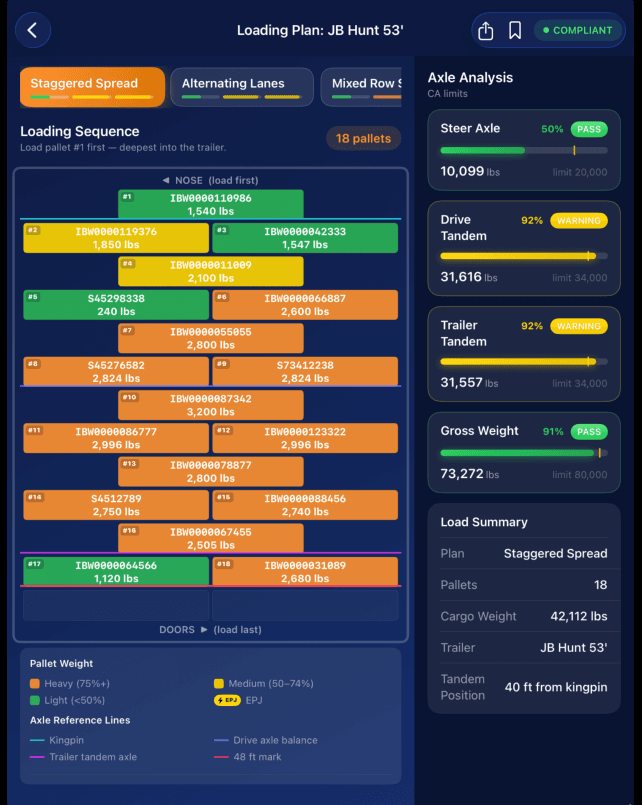
Loadly generates multiple axle-aware loading strategies for each load and ranks them by weight distribution, trailer utilization, stop sequence, and your configured compliance limits. The dock team picks the strategy that fits the freight and the operation, then loads row by row with the plan on an iPad at the dock.
Because the plan is built around your specific tractors, trailers, and jurisdiction settings, the steer, drive, tandem, gross, and payload-utilization estimates reflect the equipment you actually run — not a generic template.
- Import pallet data by scanning labels or uploading a packing list
- Generate and rank multiple axle-balanced loading strategies
- Guide loaders row by row from nose to doors
- Adjust the trailer map live while weights recalculate
- Capture proof-of-load photos tied to the final plan
From WMS data to a dock-ready plan
When the final pallet is picked, Loadly can receive the completed load from your WMS or an approved data feed and generate the trailer plan automatically — so the plan is ready when the freight is ready. No spreadsheets, no manual pallet entry, no last-minute decisions at the dock door.
Loadly does not replace your WMS. Your WMS manages orders, inventory, picking, and shipping data; Loadly is the execution layer that plans, balances, documents, and reconciles the outbound load.
Planning that carries through scale, rework, and delivery
A load plan is only useful if it holds up at the scale house. Loadly keeps the plan connected to what actually happens: drivers can upload a scale-ticket photo, Loadly records the real axle weights against the plan, and an overweight result triggers a required rework and re-scale loop before the load is marked ready for delivery.
Every load ends with a Loadly Proof Packet — the trailer plan, pallet data, axle analysis, row-by-row photos, scale tickets, rework history, and delivery proof — organized by load ID, trailer, lane, date, site, and status.
Frequently asked questions
No. Loadly sits between your WMS and the driver leaving the yard. Your WMS manages orders, inventory, picking, and shipping data. Loadly helps execute the outbound load plan, balance the trailer, document the load, and track scale and rework events.
Yes. When connected to your WMS or an approved data feed, Loadly can receive the completed picked load and automatically generate an axle-balanced trailer plan for the dock team.
Loadly is configured around your tractors, trailers, axle limits, and jurisdiction settings, so steer, drive, tandem, gross, and payload-utilization estimates reflect the equipment your fleet actually runs.
No. Loaders can scan shipping labels or the dock can upload a packing list, and Loadly captures the LPNs, pallet weights, and destinations automatically.
The execution layer between your WMS and the driver leaving the yard.
Plan. Balance. Execute. Document. Improve.