Warehouse Load Planning & Outbound Dock Execution Software
Built for scale-ready trailers from dock to delivery.
Loadly is the outbound execution layer between your WMS and the delivery door. Build axle-balanced trailer plans, guide loaders row by row, adjust pallets live, capture proof-of-load records, and carry every load through scale, rework, and delivery — all from one dashboard.
WMS Integration Ready
From final pick to load plan.
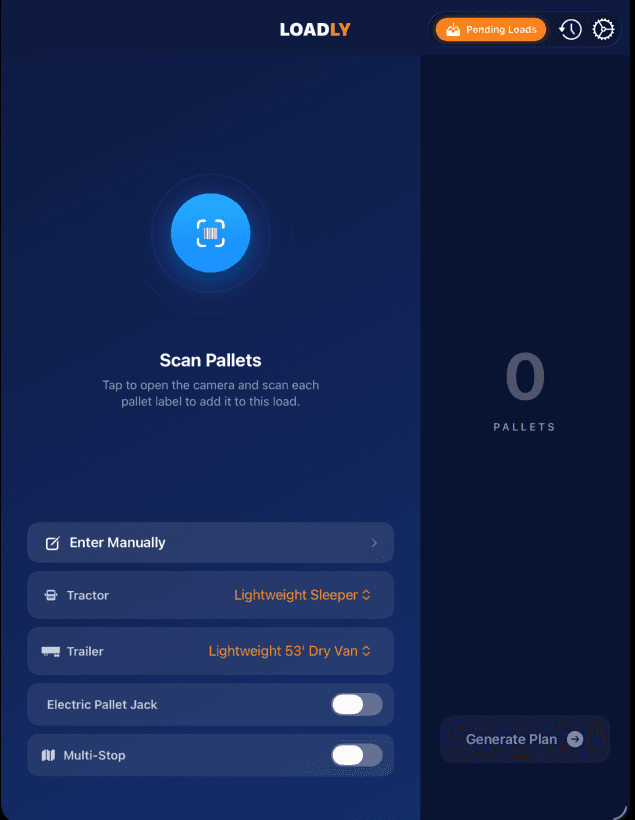
Connect Loadly to your WMS through site-approved APIs, SFTP, CSV, or approved data feeds. When the final pallet is picked, Loadly can receive the completed load data — LPNs, pallet weights, destinations, stops, trailer, door, and load ID — and automatically generate an axle-balanced trailer plan for the dock team.
No waiting on spreadsheets. No manual pallet entry. The load plan is ready when the freight is ready.
- Pull completed load data directly from your WMS or TMS
- Generate dock-ready load plans when the final pallet is picked
- Import LPNs, pallet weights, stops, destinations, doors, trailers, and load IDs
- Reduce manual entry, planning delays, and last-minute load decisions
- Support API, SFTP, CSV, and site-approved integration methods
- Keep Loadly as the execution layer without replacing the WMS
Dock Execution Features
Everything your team needs between final pick and dispatch.
Live Dock Adjustments
Move what you must. Let Loadly rebalance the rest.
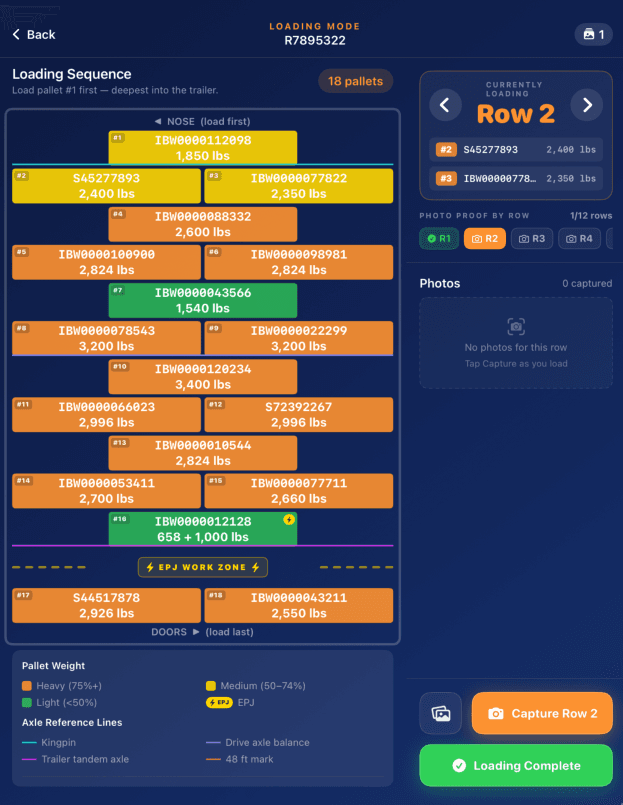
Loadly starts with a scale-ready plan, but the dock controls the final execution. If a fragile pallet needs to ride near the doors, a single-layer pallet needs a safer position, or an equivalent-weight pallet is easier to access, operators can adjust the trailer map in real time. Loadly recalculates steer, drive, tandem, gross weight, and utilization with every move.
Then tap Rebalance. Instead of leaving the operator to shuffle pallets until the axles come back in line, Loadly re-optimizes every pallet they didn't touch and works around the ones they did — keeping their placements exactly where they put them. If the current pattern can no longer be made legal, it moves to one that can, and their pallets still stay put.
- Tap one pallet, tap another — they swap instantly.
- Steer, drive, tandem, gross, and utilization bars update live with each move.
- One tap on Rebalance re-optimizes every pallet the operator didn't move.
- Their placements stay pinned — if the pattern can't balance, Loadly switches to one that can and still keeps them in position.
- Modified pallets are marked on the trailer map, and every adjustment stays tied to the saved load record.
- Revert to the original Loadly plan at any time.
Proof-of-Load Records
Row-by-row documentation for every outbound trailer.
As the loader works from nose to doors, Loadly captures photos by row and ties each image to the final trailer plan. Supervisors can review the floor map, pallet data, photos, timestamps, and load status from the web dashboard. When a shipper claims damage, missing freight, or loading issues, the proof record is ready in seconds.
- Capture multiple photos per row.
- Attach damage photos before the trailer leaves.
- View proof photos beside the final trailer map.
- Export a Loadly Proof Packet for claims, disputes, and internal review.
- Keep records organized by load ID, trailer, lane, date, site, and status.
- Store records securely in your private Loadly workspace with role-based access.
Driver Companion App
The proof follows the load out of the yard.
Your dock builds the plan, and the driver carries the load record into the field. Without creating an account, the driver can open a load by its Load ID, review the approved plan and axle estimates, photograph the trailer number, tandems, and 5th wheel position, record scale results, complete rework loops when needed, and capture proof-of-delivery photos. Every photo, timestamp, scale result, and delivery update flows back to the Loadly dashboard.
- No login required — drivers open loads by unique Load ID.
- Review the approved trailer plan and axle-weight estimates.
- Photograph trailer number, tandem position, and 5th wheel position.
- Upload scale-ticket photos and record actual axle weights.
- Failed scale checks trigger a required rework and re-scale workflow.
- Capture proof-of-delivery photos and delivery timeline events.
- All driver activity flows back to the dashboard and Proof Packet.
- Native app on iPhone, installable web app on Android.
Scale Ticket Reconciliation
Compare planned weights against actual scale results.
Loadly does not stop when the trailer leaves the dock. Drivers can upload a scale-ticket photo from the companion app, and Loadly records the actual steer, drive, tandem, and gross weights against the approved load plan. If the trailer is overweight, Loadly creates a rework loop that requires correction, re-scaling, and a new scale-ticket photo before the load can be marked ready for delivery.
- Upload scale-ticket photos from the driver companion app
- Record steer, drive, tandem, gross, and timestamp
- Compare actual scale results against the approved Loadly plan
- Flag overweight or high-risk axle groups
- Create a required rework and re-scale loop for failed loads
- Save every scale ticket to the Loadly Proof Packet
- Track scale variance by trailer, tractor, lane, customer, loader, and site
- Use historical scale results to improve future trailer and tractor profiles
Dock Performance Dashboard
See what happened after the load was built.
Loadly is more than an iPad loading tool — it is a dock execution management system. Supervisors can review saved loads, rework flags, axle analysis, trailer utilization, proof photos, scale-ticket history, driver activity, and site performance from one dashboard.
- Upload a packing list to pre-stage a load for the dock
- View saved loads by date, weight, trailer, lane, site, and status
- Mark loads compliant, rework-needed, scaled, delivered, or disputed
- Review axle analysis after the load is saved
- Compare planned weights against scale-ticket results
- See trailer utilization and unused payload capacity
- Pull up row-by-row photos for dispute support
- Export Loadly Proof Packets for claims and internal review
- Track trends by site, lane, customer, trailer, and team
Live Demo
Plan a trailer fast and effortlessly.
Scan, balance, and ship — no spreadsheets, no guesswork, no surprises.
ROI Calculator
What is a rework really costing you?
Set your users, sites, and iPad option to estimate the labor, detention, fuel, fines, chargebacks, claims, and scale-ticket rework costs Loadly may help reduce.
In-transit damage-claim defense is powered by row-by-row photo proof — included on every plan.
* Achievable when Loadly's loading plan is followed, configured correctly for your tractors, trailers, and jurisdiction settings, and supported by accurate pallet weight data. Net ROI excludes the one-time Implementation & Onboarding fee. Savings are estimates based on your inputs and configurable assumptions; actual results vary by fleet, labor rates, detention costs, claims, scale-ticket requirements, pallet data accuracy, and operating procedures.
Managed Dock Hardware
Loadly-ready iPads for every dock team.
Loadly can provide managed iPads preloaded with the Loadly app, rugged cases, screen protection, device management, and multi-device charging stations. Customers can bring their own devices or use Loadly-managed hardware for a faster rollout.
- Loadly app preloaded on each iPad
- Rugged cases and screen protectors included
- Multi-device charging stations available
- Device management, remote support, and replacement workflow
- Optional managed hardware bundle by site
- Bring-your-own-device option available
Implementation & Onboarding
Configured around your trailers, tractors, lanes, and dock process.
Every site has different equipment, rules, and loading habits. Loadly onboarding helps configure trailer profiles, tractor settings, axle limits, jurisdiction rules, user roles, WMS data feeds, driver workflows, proof records, and reporting before the first live load.
- Tractor and trailer profile setup
- Jurisdiction and fleet-specific limit configuration
- User roles and site access
- WMS, TMS, CSV, SFTP, or API data mapping
- Dock workflow setup and training
- Driver companion app setup
- Proof Packet and dashboard configuration
- Pilot loads and scale-ticket calibration
Loadly is the execution layer between your WMS and the driver leaving the yard.
Your WMS knows what needs to ship. Loadly helps your dock team decide how to load it, balance it, adjust it, document it, scale it, and prove what happened.
FAQ
Common questions.
Can Loadly connect to our WMS or TMS?
Can Loadly generate a load plan when the final pallet is picked?
Does Loadly replace our WMS?
Can drivers upload scale tickets?
What happens if a trailer scales overweight?
What is a Loadly Proof Packet?
Is there an Implementation & Onboarding fee?
What do I need before implementing Loadly?
Where do the ROI calculator numbers come from?
- Truck operating costs — ATRI's marginal cost of trucking (its ~$0.90/mi variable rate drives our "wasted miles" line, and its cost components sit behind the $55/hr detention rate), Operational Costs of Trucking: 2025 Update. view report
- Forklift operator wages ($22/hr) — BLS OEWS, Industrial Truck & Tractor Operators (53-7051) median. view wage table
- Driver wages — BLS OEWS, Heavy & Tractor-Trailer Truck Drivers (53-3032). view wage table
- Overweight fines — FMCSA civil penalties plus state DOT overweight schedules (which vary by state). FMCSA civil penalties
- OTIF chargebacks (3% of COGS) — Walmart's On-Time In-Full program. supplier program
- Cargo damage claim averages — cargo-insurance claims data (Travelers transportation resources). view resources
- Rework reduction (more than 90%*) — Loadly customer outcomes, when the app is used as designed.
- Rework duration (2 hrs) — trucks often wait for an operator before re-handling begins.
- Truck detention rate ($55/hr) — driver pay + fixed truck ownership while parked, excluding per-mile driving costs.
- Wasted miles (~20 mi/rework) — the driver backtracks to the dock and re-runs the scale for each rework.
- Multi-touch factor (1.2×) — a problem load is sometimes handled more than once.
- Opportunity cost ($44/rework) — blocked-dock throughput, kept to one forklift-shift equivalent.
- Incidence rates & photo claim-win uplift (+45 pts) — how often each cost is triggered, and how much dock photo proof improves disputed-claim outcomes.
How is the per-rework cost calculated?
- Forklift operator labor — $44 (2 hrs × $22/hr)
- Truck detention — $110 (2 hrs × $55/hr — the driver's pay and the truck's fixed ownership costs while it sits waiting; the per-mile driving costs are excluded here)
- Opportunity cost — $44 (blocked-dock throughput, kept to one forklift-shift equivalent)
- Fuel & wasted miles — $18 (~20 mi × $0.90/mi — the driver has to come back and re-run the scale ~1.6×; priced at ATRI's variable per-mile rate so the driver's time isn't double-counted)